The Best AI Presentation Makers, Tested With One Identical 10-Slide Outline
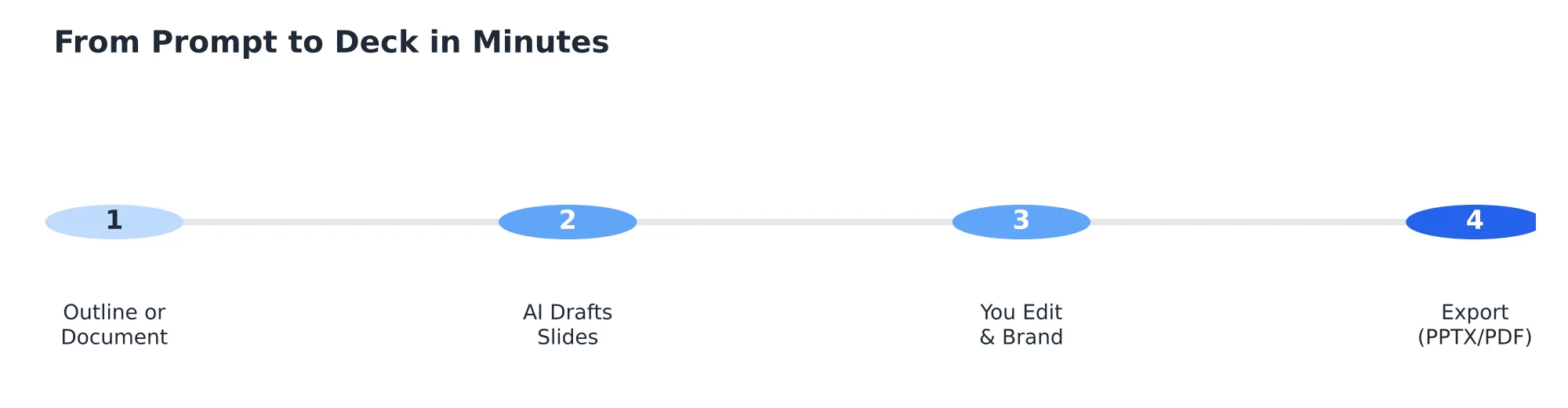
The best AI presentation makers turn a prompt or document into finished slides in minutes. Gamma leads for web-first decks. Plus AI wins if you live in Google Slides or PowerPoint. Beautiful.ai keeps brands tidy. Canva AI gives the most design control. Always test the PPTX export first, because fonts and charts often break.
This guide compares ten tools against one identical 10-slide outline, flags where PowerPoint export fidelity breaks down, and covers the pricing traps that show up after you’ve already built your deck.
Quick Verdict: The Best AI Presentation Makers at a Glance
| Tool | Best For | Starting Price |
|---|---|---|
| Gamma | Web-first visual decks | Free tier; paid from ~$10/mo |
| Plus AI | Google Slides and PowerPoint users | Free tier; paid from ~$10/mo |
| Beautiful.ai | Brand consistency | From ~$12/mo |
| Canva AI (Magic Studio) | Design freedom | Free tier; Pro from ~$13/mo |
| Microsoft Copilot in PowerPoint | Teams already paying for 365 | Included in qualifying 365 plans |
| Gemini in Google Slides | Free, light use | Included with Google Workspace |
| Pitch | Team and sales decks | Free tier; paid from ~$8/mo per user |
| Tome | Scrolling narrative decks | Free tier; paid plans available |
| Decktopus | Total beginners | Free tier; paid from ~$9.99/mo |
| Visme | Data-heavy slides | Free tier; paid from ~$15/mo |
How We Tested
We fed the same 10-slide outline — a title slide, agenda, three content slides, one data slide with a chart, two comparison slides, a team slide, and a closing slide — into every tool, then scored the results on content accuracy, visual design quality, export fidelity to PPTX, and price.
The Best AI Presentation Makers, Reviewed
Gamma
Produces the most visually polished result of any tool tested when the deck stays inside Gamma’s own web-based viewer, though some of that polish is lost on PPTX export.
Plus AI
Works as an add-on directly inside Google Slides or PowerPoint rather than a separate app, which means there’s no export step at all — the deck is already native to the tool you’ll present from.
Beautiful.ai
Enforces design consistency automatically as you edit, which is specifically useful for teams where several people build slides and brand consistency keeps slipping.
Canva AI (Magic Studio)
Gave us the most manual design control after the initial AI-generated draft, at the cost of needing more hands-on editing than the more fully automated tools.
Microsoft Copilot in PowerPoint
The most practical choice for teams already paying for a qualifying Microsoft 365 plan, since it works natively inside PowerPoint with no new export or compatibility step.
Gemini in Google Slides
A capable free option for light, occasional use, included for Google Workspace users at no extra cost.
Pitch
Built with team collaboration and sales-deck workflows specifically in mind, including built-in commenting and version tracking.
Tome
Produces a distinctive scrolling, narrative-style deck format that reads more like a web page than a traditional slide deck — a strong fit for some audiences, a mismatch for others expecting a standard presentation format.
Decktopus
The simplest, most beginner-friendly interface of any tool tested, trading some design sophistication for ease of use.
Visme
Handled our data slide with a chart better than most competitors, making it the strongest pick specifically for data-heavy presentations.
Export Fidelity: What Breaks on PPTX Download
Across the tools tested, font substitution was the most common PPTX export problem — a custom font rendering correctly in the tool’s own editor often gets swapped for a generic substitute once downloaded. Charts frequently export as flat, non-editable images rather than live PowerPoint chart objects, meaning you can’t adjust the underlying data after export without rebuilding the chart. Tools built as native PowerPoint add-ins (Microsoft Copilot, Plus AI) avoid this problem entirely since there’s no separate export step.
Hidden Pricing Traps to Check Before You Subscribe
- Credit systems that burn through a monthly allowance faster than expected, especially with multiple regeneration attempts per slide.
- Watermarks and locked exports on free plans that only become visible once you try to download.
- Forced annual billing to access the advertised lower monthly price.
- What happens to your decks after cancellation — check whether you retain access or lose your work entirely.
Where Every AI Presentation Maker Still Fails
Made-up facts and stale statistics show up across every tool tested when the prompt doesn’t supply the actual data — always fact-check any number or claim an AI tool generates rather than supplied by you. Generic stock imagery and similar-looking layouts are also a consistent weakness; decks from different tools using similar prompts can end up looking more alike than expected.
Brand, Privacy, and Security Checks
Check each tool’s specific policy on whether content you upload or generate is used to train shared models — this varies meaningfully between vendors and matters most for decks containing confidential business information.
Which Tool Should You Pick?
- Sales teams: Pitch, for its collaboration and tracking features built specifically for that workflow.
- Teaching and training: Gamma or Tome, for engaging, less formal visual formats.
- Startups and pitch decks: Gamma for visual polish, Canva AI if you need more manual control.
- Consulting and data-heavy work: Visme, for its stronger chart handling.
How to Get Better Slides From Any AI Tool
Supply your own data and key facts directly in the prompt rather than letting the tool generate placeholder statistics, specify your actual audience and the one action you want them to take, and always review the PPTX export before presenting from it rather than assuming the editor view matches the exported file exactly.